Swatch Omega Moonswatch User Guide: How to Operate Your Timepiece
The Swatch Omega Moonswatch collection blends the heritage of the Omega Speedmaster with the accessible, modern design of Swatch. While these watches are designed for everyday wear, first-time owners often have questions about the chronograph functions and the specific hand movements. This guide provides everything you need to know about your Moonswatch to ensure it operates correctly.
Understanding the Dial and Hands
Before operating the watch, it is important to distinguish between the time-telling hands and the chronograph (stopwatch) hands. Many new users are confused by the red or orange hands on the dial.
- Main Hands: The large hour and minute hands show the current time.
- Central Chronograph Second Hand: The long, thin red/orange hand is not the ticking second hand for the time of day. It is the stopwatch hand. It remains stationary at 12 o'clock until the chronograph is activated.
- Small Seconds Sub-dial: The small dial (usually located at the 9 o'clock position) is where you track the actual passing seconds of the current time.
- Minute and Hour Counters: The other two sub-dials track elapsed minutes and hours once the chronograph is started.
How to Set the Time and Date
Setting the time on your Moonswatch is a straightforward process using the crown located at the 3 o'clock position.
- Pull the crown out to the second click: This is the furthest position.
- Rotate the crown: Turn it clockwise or counter-clockwise to move the hour and minute hands to the correct time.
- Push the crown back in: Once the time is set, press the crown firmly against the case to restart the movement and ensure water resistance.
How to Operate the Chronograph
The chronograph allows you to measure elapsed time with precision. This is operated using the two pushers located above and below the crown.
Starting and Stopping the Timer
To begin timing an event, press the top pusher. The central red/orange second hand will begin to sweep around the dial, and the sub-dials will begin to track elapsed minutes and hours. To stop the timer, press the top pusher again. The hand will stop exactly where the event ended.
Resetting the Chronograph
Once the timer has been stopped, you can return all chronograph hands to their zero position. To do this, press the bottom pusher. The central second hand and the minute/hour counters will snap back to the 12 o'clock position.
Common Questions and Troubleshooting
Why is the red/orange hand not moving?
As mentioned previously, the red/orange hand is a stopwatch hand. It will only move when you press the top pusher. If you are looking for the current seconds of the day, look at the small sub-dial at the 9 o'clock position.
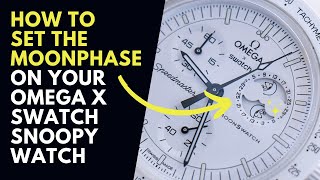
How to set the Moonphase on a Moonswatch?
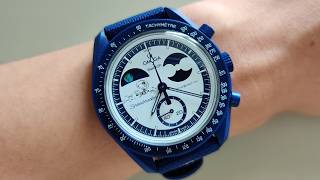
It is a common point of confusion for new buyers: the Swatch Omega Moonswatch does not have a functional moonphase complication. While the design is inspired by space exploration and the Moonwatch heritage, the dial features are focused on the chronograph functions. If you see a moon-like graphic on the dial, it is a decorative element rather than a programmable lunar tracker.
Maintaining Your Moonswatch
To keep your timepiece in top condition, follow these simple maintenance tips:
- Avoid Extreme Heat: Bioceramic materials can be sensitive to extreme temperature fluctuations.
- Cleaning: Use a soft, damp cloth to wipe the case and strap. Avoid using harsh chemicals that could damage the finish.
- Water Resistance: While the Moonswatch is water-resistant, it