How To Make A Pound Sign On American Keyboard
Depending on where you are from or the software you are using, the term "pound sign" can refer to two entirely different symbols. In the United States, the pound sign typically refers to the hash or number sign (#). However, in the United Kingdom and many other parts of the world, it refers to the pound sterling currency symbol (£).
Because American keyboards are designed for US English layouts, typing the currency symbol is not as straightforward as typing the hash key. This guide will show you how to access both symbols quickly and efficiently.
How to Type the Hash Key (#)
For most users in the US, the "pound sign" is the hash key. This is a standard character found on almost every American QWERTY keyboard. To type this symbol, follow these simple steps:
- Locate the number 3 key on the top row of your keyboard.
- Hold down the Shift key.
- Press the 3 key while holding Shift.
This combination will produce the # symbol, which is widely used for hashtags on social media, numbering lists, or as a delimiter in programming.
How to Type the Pound Sterling Symbol (£)
The British pound sterling symbol (£) is not printed on a standard US keyboard. Therefore, there is no single dedicated key to produce it. Depending on your operating system and the software you are using, there are several ways to solve this.
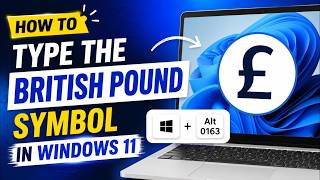
Method 1: Using Alt Codes (Windows)If you are using a Windows PC with a numeric keypad (the block of numbers on the right side), you can use an Alt code. This is the most reliable way to type currency symbols without changing your system settings.
- Ensure Num Lock is turned on.
- Press and hold the Alt key.
- While holding Alt, type the numbers 0163 on the numeric keypad.
- Release the Alt key, and the £ symbol will appear.
Note: Using the number row at the top of the keyboard will not work for Alt codes; you must use the dedicated number pad.
Method 2: Using Option Keys (macOS)Apple makes it significantly easier to type international currency symbols on American keyboards. If you are using a Mac, you do not need to memorize complex codes.
- Press and hold the Option key.
- Press the number 3 key.
This shortcut instantly generates the £ symbol on any macOS device.
Method 3: Using the Character Map or Emoji PanelIf you do not have a numeric keypad or cannot remember the shortcuts, you can use the built-in visual selectors provided by your operating system.
On Windows: Press Windows Key + Period (.) or Windows Key + Semicolon (;) to open the emoji and symbol panel. Navigate to the "Symbols" tab (the omega sign Ω) and scroll down to find the currency section.
On Mac: Press Control + Command + Space to bring up the Character Viewer. Type "pound" into the search bar to find the symbol quickly.
Changing Keyboard Layouts for Frequent Use
If your job requires you to type the pound sterling symbol frequently, you might find it tedious to use Alt codes. A more permanent solution is to add the UK English keyboard layout to your system settings.
Once the UK layout is added, you can toggle between US and UK English using a shortcut (usually Alt + Shift or Windows + Space). In the UK layout, the pound sign is typically mapped to Shift + 3, while the hash sign moves to a different