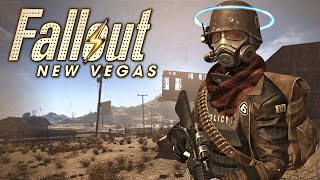
Fallout New Vegas Mod Remaster: Revitalizing a Classic for Modern Players
Since its release in 2010, Fallout New Vegas has remained a fan‑favorite entry in the post‑apocalyptic series. Its deep role‑playing mechanics, branching storylines, and iconic Mojave setting still attract new players, but the original graphics and engine limitations can feel dated on today’s hardware. The Fallout New Vegas Mod Remaster—a curated collection of community‑created modifications—offers a comprehensive upgrade that respects the game’s core identity while delivering a fresh, polished experience.
What Is the Fallout New Vegas Mod Remaster?
The Mod Remaster is not a single file but a modpack assembled by the creator known as VeryLastKiss'. It combines dozens of individual mods that have been tested together for compatibility. The goal is simple: improve visuals, refine gameplay, and increase stability without rewriting the entire game. By pulling resources from popular sites such as Nexus Mods and the dedicated portal Nuclear Sunset, the pack provides a one‑stop solution for anyone who wants to experience New Vegas as if it were released yesterday.
Key Features of the Mod Remaster
- Enhanced Graphics
- High‑resolution texture packs replace the original 512×512 assets with 2K‑4K alternatives, giving walls, clothing, and weapons a crisp look.
- Improved models for characters and creatures add more polygons, resulting in smoother animations and better silhouette definition.
- Dynamic lighting and weather shaders create realistic shadows, rain, and dust storms that react to the time of day.
- Gameplay Tweaks
- Rebalanced weapon damage and armor values to align with the series’ later titles, while preserving the original difficulty curve.
- Expanded dialogue options and added new quest markers to reduce frustration from missed objectives.
- Optional hardcore mode introduces realistic survival mechanics such as thirst, fatigue, and more demanding combat.
- Stability and Performance Improvements
- Script optimizations and memory management patches lower crash rates on modern 64‑bit systems.
- Compatibility patches ensure smooth interaction with popular utilities like ENBSeries and Mod Organizer 2.
- Performance profiles let players choose between visual fidelity and frame‑rate priority.
Step‑by‑Step Installation Guide
- Prepare Your Base Game
Make sure you have a clean installation of Fallout New Vegas (Steam or GOG version). Verify the game runs without mods before proceeding.
- Download the Required Tools
Install a mod manager such as Mod Organizer 2 or Vortex. These tools handle load order and conflict resolution automatically.
- Obtain the Modpack Files
Visit the official download page on Nexus Mods or the mirror on Nuclear Sunset. Download the main archive and any optional add‑ons you wish to enable.
- Import the Archive into Your Mod Manager
Drag the downloaded .zip or .7z file into the manager’s “mods” pane. The manager will unpack the files and display a list of individual components.
- Apply the Recommended Load Order
VeryLastKiss' provides a text file named loadorder.txt. Load this file into the manager, or use the built‑in “Sort Plugins” feature to let the manager arrange the mods automatically.
- Configure Optional Settings
If you prefer a higher frame rate, enable the “Performance Profile” in the ENB settings. For maximum visual fidelity, select the “Ultra Graphics” preset.
- Launch the Game
Start New Vegas through the mod manager’s “Run” button. The first launch may take a few extra minutes while the engine compiles the new assets.
Why the Mod Remaster Is Worth Your Time
Beyond the obvious visual upgrades, the Mod Remaster respects the original design philosophy of Fallout New Vegas. It does not replace the game’s narrative or core mechanics; instead, it refines them. Players report:
- Longer play sessions thanks to reduced crashes and smoother performance.
- A deeper sense of immersion from realistic lighting and weather effects.
- More balanced combat encounters that reward strategic planning.
These benefits make the modpack appealing to both veterans who want to revisit the Mojave with fresh eyes and newcomers seeking a modern entry point.
Supporting the Creator and Community
The Mod Remaster is a labor‑intensive project maintained by VeryLastKiss' and a network of volunteers. If you enjoy the enhancements and want to ensure continued updates, consider supporting the creator on Patreon. Patrons receive early access to new patches, exclusive behind‑the‑scenes videos (such as the “how to create your own mod” tutorial), and direct communication channels for feedback.
Conclusion
In a gaming landscape where remakes and remasters dominate the market, the Fallout New Vegas Mod Remaster stands out as a community‑driven effort that revitalizes a classic without sacrificing its soul. By combining high‑resolution textures, thoughtful gameplay tweaks, and robust stability fixes, the pack delivers a polished experience that feels both nostalgic and contemporary. Whether you’re a long‑time fan or a first‑time explorer of the Mojave, the Mod Remaster offers a compelling reason to dive back into the world of Fallout New Vegas today.
Additional Resources
- Official Modpack Page on Nexus Mods
- Nuclear Sunset – Community Hub
- Patreon – Support VeryLastKiss'